Set it up in four steps
- Select your brand. In the Overview setup card, review the short Search terms, Sources and Markets summary. Choose Start Voice of Customer to save the proposed settings, or Skip Voice of Customer to leave it off. Choose Change settings to open the full editor in Setup & method before starting. Back to setup returns to the Overview row without saving. If there is no usable source or the suggested settings need attention, Choose sources opens the editor with the problem focused; Skip stays available. You can also open Setup & method → Voice of Customer or Account settings → Voice of Customer. The link Edit search terms and sources on the report opens the same page.
- Review the proposed search terms. Choose a measurement language and a type for each.
- Add public sources and turn on the sources you want collected.
- Check the counters, then choose Start Voice of Customer, or Skip Voice of Customer to continue without collection. For an active setup, choose Save changes.
Account owners can save; members can read. Opening Settings does not start a collection. The form may suggest your brand name and aliases or show an earlier proposal as an unsaved draft. Review it before saving; suggestions never start collection.
1. Search terms, language and type
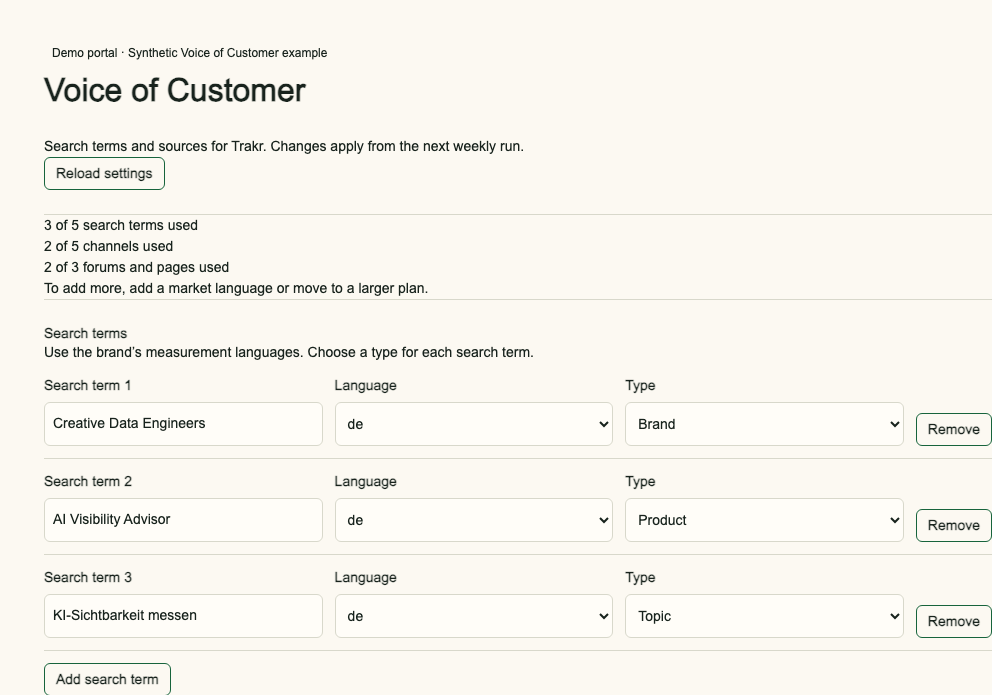
Write the phrase a customer would use. Choose German (de) for a German phrase; this selects the measurement language, not a translation. If German is missing, add it to the brand’s measurement setup first. A phrase can appear once per language and must contain 2 to 80 characters.
| Type | Example with German (de) | What it means |
|---|---|---|
| Brand | Creative Data Engineers | Find discussion mentioning the brand. |
| Product | AI Visibility Advisor | Find discussion about a product or service. |
| Competitor | Beispiel Wettbewerber | Find discussion and identify competitor mentions in the report. |
| Topic | KI-Sichtbarkeit messen | Find discussion around a customer question or subject. |
All four types are searched. Search terms discover recent YouTube videos using the chosen language and market, and also feed Reddit and forum discovery. Relevance checks then filter the collected threads. A type is a label, not an exclusion.
2. Sources to collect
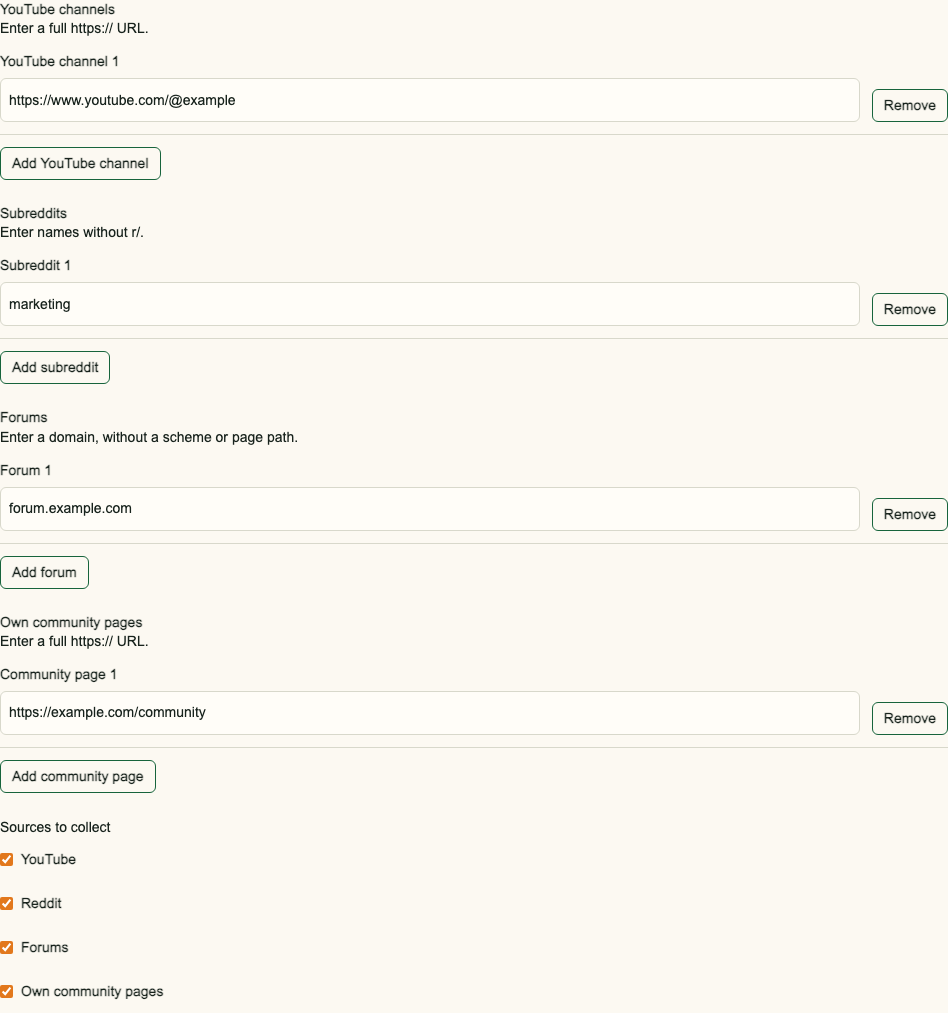
| Source | Enter | Example |
|---|---|---|
| YouTube channel | Full channel URL | https://www.youtube.com/@example |
| Subreddit | Name without r/ | marketing |
| Forum | Domain without scheme or path | forum.example.com |
| Own community page | Full public HTTPS URL | https://example.com/community |
| Exclusion | Exact unwanted phrase | jobs at example |
When YouTube is enabled, Only my channels needs at least one channel. When Reddit is enabled, Only my subreddits needs at least one subreddit. Add an entry or choose All of YouTube or All of Reddit.
A listed source is collected only when its Sources to collect switch is on. An exclusion removes threads containing that phrase in the available title or text; broad phrases can hide relevant comments. LinkedIn is not supported. Community pages must be public and pass address and robots checks. Unreadable sources appear as gaps in the report.
3. Check the limits
| Allowance | Shared by | Standard amount |
|---|---|---|
| Search terms | All four term types | 5 |
| Channels | YouTube channels + subreddits | 5 total |
| Sites | Forums + own community pages | 3 total |
| Exclusions | Exact phrases | 20 |
| Analysed comments | All enabled sources | 1,500 per calendar month |
These are standard values. Your allowance can differ by measurement scope and licence; the counters in Settings are authoritative for this brand. Five YouTube channels and five subreddits would exceed a five-channel shared allowance.
The form prevents another entry when a counter is full, and the server rejects an over-limit save. If the allowance later falls below a saved list, the next run uses entries in saved order up to the new limit and marks that limit change in the report. The monthly comment allowance is converted to a weekly sampling size. When more relevant comments are found, the week is marked as sampled. A source failure does not stop the rest of the run.
4. Save and check the next run
The status block at the top says whether Voice of Customer is not set up, off or on. Start Voice of Customer saves the displayed terms and sources. Before the first decision, Skip Voice of Customer saves it as off, without collection. Nothing is saved merely by opening or editing the form. Pressing Enter in a text field cannot start or skip collection. The Start and Skip actions repeat at the bottom.
When Voice of Customer is on, edits show an Unsaved changes bar with Discard and Save changes. Turn off Voice of Customer asks you to confirm: saved terms, exclusions, search modes and source lists are kept, all sources are turned off, and no comments are collected from the next run. Unsaved edits are discarded. Saving with every source unchecked opens the same confirmation dialog and keeps your edited lists. To start it again, turn on the sources you want and click Start Voice of Customer. The current run keeps its saved settings.
After a save, focus moves to the status confirmation. Start or Skip from the Overview row, or from the editor opened through Change settings, returns to Overview with the row marked Done and the next required step open. If a save fails, focus moves to There is a problem at the top of the form. Each message links to the field to fix. A newer saved version requires reloading and comparing before trying again. Changes appear as markers in the next report.
The MCP connector can read published VoC weeks, current limits and aggregate settings usage with get_voice_of_customer. It also reports whether Voice of Customer is not set up, skipped or active. Your assistant can start, save, skip or turn off Voice of Customer with set_voice_of_customer using an Owner or Member connector login. It must show you the changes and get a clear yes before saving.
Frequently asked questions
What does German language and Type mean?
German selects the German measurement language for that search term. Type labels it as Brand, Product, Competitor or Topic; all four are searched.
Can I add five YouTube channels and five subreddits?
The two lists share one channel allowance. Check the counter for this brand.
Will a source error stop the weekly report?
No. The failed source is recorded as a gap and available sources continue.