Connect Claude
You can also start here from Website and market, step 1 of your setup. Overview shows eight steps. Steps completed with your assistant show as done in the portal automatically.
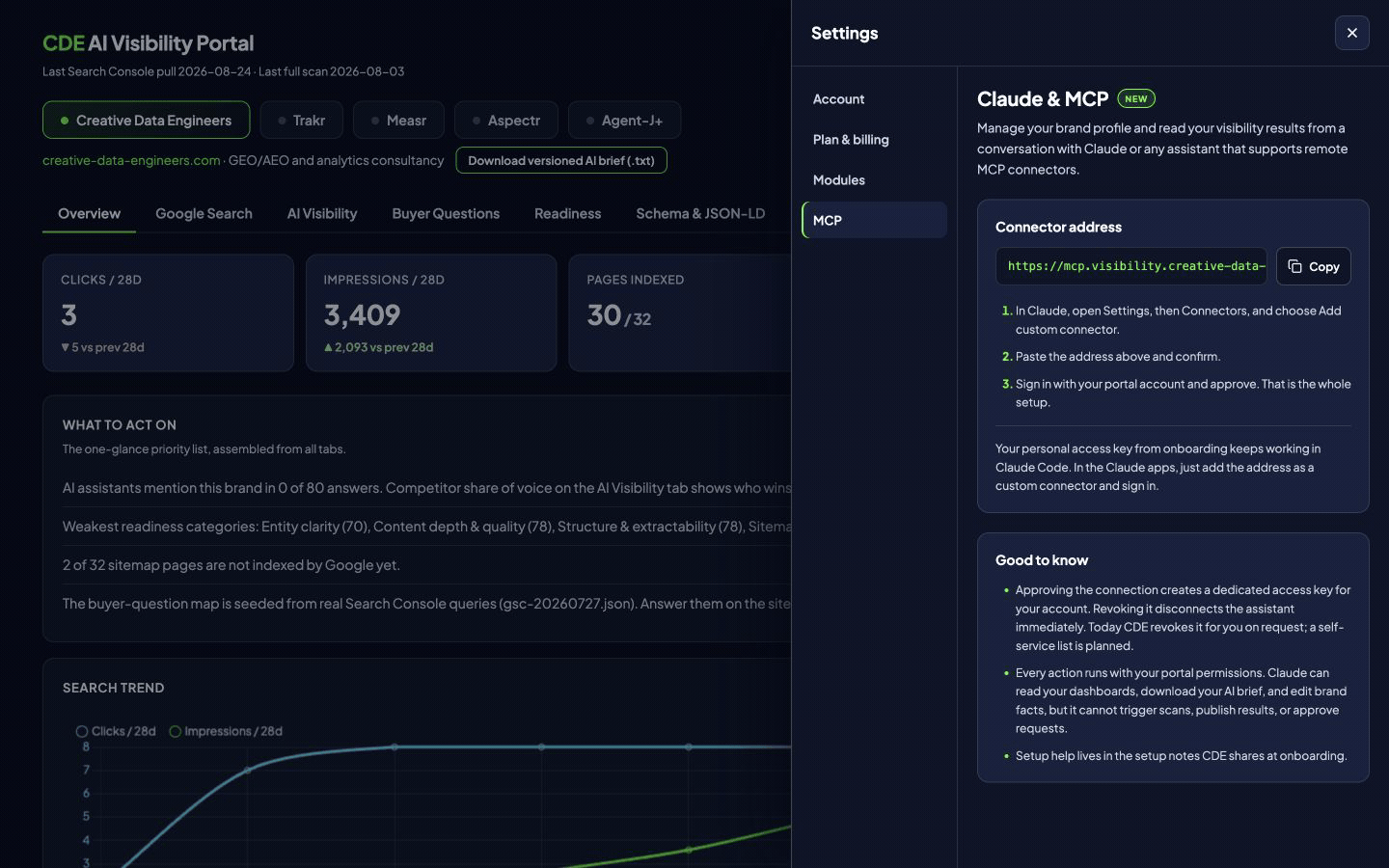
Open Account settings, then MCP connector. Copy the server address shown there into Claude's custom connector setup and complete the sign-in and consent flow with your portal account. Access follows your account membership and role. Keep personal credentials and sign-in links private. If the connector is unavailable, ask the account owner to check the enabled features.
Works with Claude, ChatGPT, Codex, Microsoft Copilot and other assistants that support custom connectors.
Set up a brand and its markets
Your assistant can also set up your first brand. Ask it to read your account capacity, add your website, and configure your markets. One market is one brand or website in one country in one language. Each market has the question limit shown for your account. For another country or language on the same website, update that brand's market configuration.
Start with a task
Try “What should we do this week?”, “Show the evidence behind this recommendation” or “Help me review our brand facts.” Ask Claude to name the brand, release and evidence date. The connector can read published results and documents, help with setup inputs and record supported changes after confirmation. It does not make missing evidence available.
Confirm changes and approve questions
Read operations do not approve changes. Review the values and consequences before confirming a save. Claude shows you the changes and gets a clear yes before saving. Saving applies complete facts; no separate confirmation call is needed. The account owner explicitly approves the questions once during onboarding.
For the current sampling method, approve the exact displayed proposal. Claude sends start_measurement:true and the exact contract_digest with that same approval. No separate start confirmation is needed; omitting the compatibility flag does not disable a commissioned automatic service. Three answers per question and service are collected at least one hour apart. Older contracts remain readable as history; they do not require an owner activation step.
After question approval, measurement starts automatically when setup is complete and runs monthly. First results usually appear within an hour after measurement starts. Results appear automatically and update until the report is final. Use get_next_steps to check progress. If collection is paused, the collected responses are retained; cancellation prevents an automatic restart. Saved setup changes apply automatically from the next run with trend markers. Running measurement continues; no renewed approval is needed.
Earlier three-day contracts retain their stored schedule and cost history; no action is needed on legacy estimates. After collection, the report is prepared for publication automatically. An authorized operator can use get_output_release and request_output_publication for those contracts.
Technical reference
For market questions, read get_measurement_setup for the selected brand before explaining or changing it. Its country and language combinations are the configured markets; licence.used and licence.total show account use, and licence.maximum_questions_per_market already includes any account-specific limit, capped at 100. If the field is absent, use licence.maximum_questions with the same cap. One brand or website in one country and one language is one market. A different country or language is another market. The brand shares one semantic question catalog across its markets, with localized wording. Each market measures that catalog separately, within its effective question limit. Independently edited per-market catalogs are not available. B2B and B2C are question categories within that catalog. They do not create markets or increase the question limit. Separate B2B/B2C report filters are not available. A saved change to an existing market does not create a new one. The standard plan allowances are Start 1, System 2 and Scale 5 markets, but explain the connected account using the returned licence, especially for custom limits. Read the full market guide.
save_brand_facts: Saving brand facts applies them once the required facts are complete; until then the save stays a draft. Phone, email, logo, social profiles, legal name and owners start no work on their own. Changes to question inputs, including the trading name, update the questions automatically and mark the change in the trend.
confirm_brand_facts: Confirming is no longer needed: saving applies the facts. Older clients can still call it; it applies a pending revision, and pending question input changes then update the questions and mark the change in the trend.
The current server exposes 47 tools. Discover the live catalog through tools/list. Start with list_brands, get_brand_overview, get_measured, get_recommendations, get_next_steps and get_onboarding_status. Setup uses save_brand_facts, apply_measurement_setup and set_gsc_unavailable. Use the current returned version fields and an idempotency_key for supported writes. A conflict requires a fresh read and confirmation, not guessing a new version.
Keep the brand’s primary domain in apply_measurement_setup.domains. A primary-domain replacement returns primary_domain_immutable. Use create_brand for a different website with an available market. Existing measurements continue.
Ask about Voice of Customer
get_voice_of_customer reads the selected brand’s published Voice of Customer results, setup state and current settings revision. It returns up to 12 published weeks, current brand limits, aggregate settings usage, source counts and gaps, topics, sentiment, quotes and change markers. The default is 4 weeks. Ask for the report week and settings revision before comparing periods. A sampled week is a sample, and missing values are unavailable rather than zero.
set_voice_of_customer lets an owner or member save optional Voice of Customer settings, skip setup or turn collection off after showing the changes and getting a clear yes. Read get_voice_of_customer first and use its expected_revision when saving the complete settings. Use skip:true to skip or turn off; saved search terms and source lists are kept so collection can be started again. If the settings changed meanwhile, read them again and confirm the changes before retrying. Saved settings take effect on the next weekly run; Voice of Customer never blocks measurement. Account owners can also configure collection in the portal. The setup guide explains search terms, German language, Type, source lists and limits. For Team actions and most Account settings, use the portal. The connector can read account context and an owner can update account name and personal display label with update_account_context; Team invitations are portal actions. Owners can add a brand with create_brand, after checking get_account_context.capacity.
Retrieve complete documents
Use list_documents and get_document with the returned read_arguments. Follow all next_chunk pages. Keep brand_slug, file_name, release_id and document_digest bound to that document. For a partitioned document, reconstruct and verify every index chunk first; then use the original file name and part_index=ref.order, restarting chunk_index at zero for each part. Verify part_sha256, the final content_sha256 and byte length. Do not substitute a part filename or envelope hash into the original request. Missing or changed chunks require a new complete retrieval.
Schema and evidence limits
Use get_schema_drafts to inspect current-release schema evidence. For delivery contracts, follow the producer's replacement scope, summary and lines. delivery_ready does not mean copy_ready. Older script_changes describe added, removed, changed or unchanged scripts. Other scripts stay unchanged. No changes means no action. Historical arrays are comparison evidence only.
Never supply a replacement block for historical:true or copy_ready:false. Verify the complete paste hash before showing approved markup. Copying is not installation. Preliminary results and fallback evidence keep their reduced confidence; they do not support final trends or recommendations merely because Claude can read them.
Frequently asked questions
Can Claude start the first measurement?
With owner access, Claude can record your one onboarding question approval. Measurement then starts automatically when setup is complete and runs monthly.
Can Claude read a missing document?
No. Only available published documents can be retrieved, and all chunks must be read.
Can Claude invite teammates?
No. Account owners send and manage invitations from Team in the portal.